Today, my first open-source project, Continuous Learning Skill, is officially released. This is an intelligent skill developed for OpenClaw that enables AI assistants to continuously learn user preferences, habits, and knowledge. This article documents the entire development process.
🎯 Why This Project?
While using OpenClaw, I discovered an interesting issue: every conversation is a fresh start, and the AI doesn't "remember" our previous interactions. Although OpenClaw provides memory features, I wanted to make it smarter—not just storing memories, but proactively learning and evolving from multiple dimensions.
Thus, the idea was born: build an automated learning skill that allows AI to:
- Extract key information and user preferences from conversations
- Analyze Obsidian vaults to build knowledge graphs
- Observe user behavior patterns to optimize response strategies
- Automatically aggregate web content to expand knowledge boundaries
🏗️ Architecture Design
The entire skill consists of four core modules:
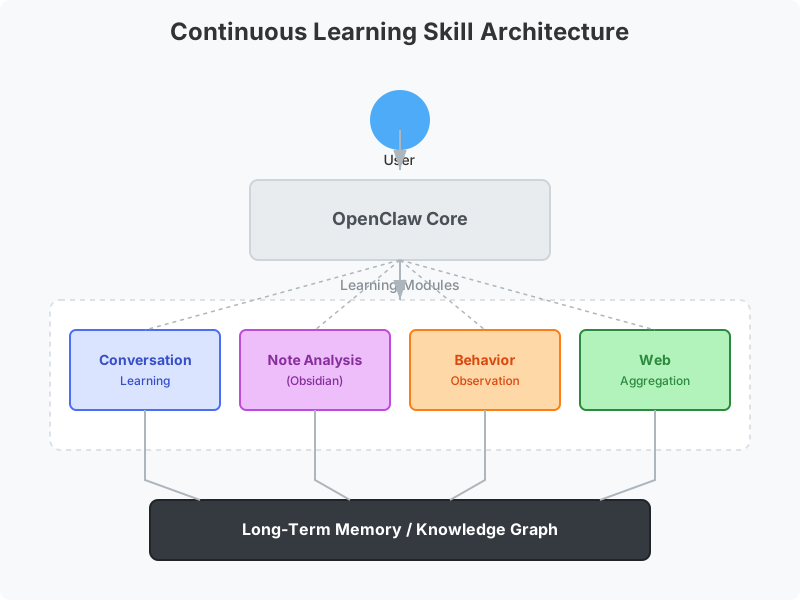
1. Conversation Learning Module
This module analyzes every conversation between the user and AI. It identifies important snippets—such as the user's profession, hobbies, and decision-making preferences—and stores these insights into long-term memory.
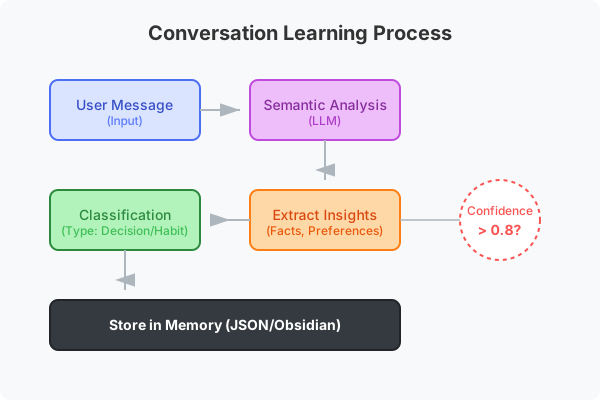
Key Technologies:
- Semantic analysis for key information extraction
- Confidence scoring system to ensure only reliable info is stored
- Automatic classification: preferences, habits, decisions, knowledge
2. Note Analysis Module
Connects to the user's Obsidian knowledge base, parses note content, and identifies knowledge nodes and relationships. This helps the AI understand the user's knowledge system.
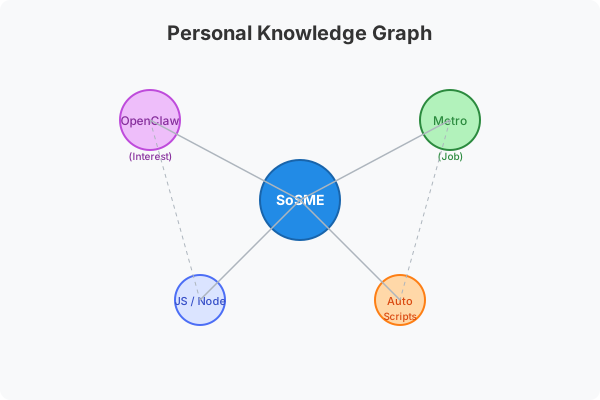
Features:
- Supports Frontmatter metadata parsing
- Automatically extracts tags and link relationships
- Builds personal knowledge graphs
- Supports mixed Chinese-English content
3. Behavior Observation Module
Records user usage patterns, such as most active times, preferred response types, and common workflows. This information is used to optimize AI response strategies.
4. Web Aggregation Module
Automatically collects and organizes web content interesting to the user, supporting RSS subscriptions and keyword monitoring.
🛠️ Tech Stack
- Runtime: Node.js
- Language: JavaScript (ES Modules)
- AI Service: Gemini API (Embeddings and Summarization)
- Storage: Local JSON files
- Documentation: Markdown
💡 Development Challenges
Challenge 1: Parsing Session Formats
OpenClaw's session logs are in JSON Lines format, containing system events, user messages, tool calls, and more. The biggest challenge was correctly parsing these complex nested structures to extract valuable conversation content.
Solution: Wrote a dedicated parser capable of identifying different message types, filtering out internal system events, and keeping only meaningful User-AI interactions.
Challenge 2: Handling Chinese Content
As a Chinese user, I needed to ensure the skill handles Chinese content correctly. This includes Chinese segmentation, semantic understanding, and mixed language scenarios.
Solution: Used Gemini's embedding models, which have excellent multilingual support and accurately understand Chinese semantics.
Challenge 3: International Release
To make the skill accessible to global OpenClaw users, I needed to internationalize the entire project, using English as the primary language while keeping Chinese translations.
Solution:
- Refactored project structure with English as the main documentation language
- Created a complete
docs/directory for Chinese translations - Updated all sample data and configuration files
📊 Project Data
During the development of this skill, I accumulated some interesting data:
- Extracted 209 valid messages from 267 sessions
- Wrote over 3,000 lines of code
- Created 4 core modules
- Authored bilingual documentation (totaling approx. 50KB)
🚀 How to Use
If you want to use this skill, the steps are simple:
- Clone the repo:
git clone https://github.com/fjmw123/continuous-learning-skill.git - Install dependencies:
npm install - Initialize config:
node scripts/init-learning.mjs - Configure
.envfile with your API keys - Run the learning pipeline:
node scripts/learning-pipeline.mjs
🎯 Future Plans
The first version of this skill is just the beginning. I plan to add more features in the future:
- Knowledge Graph Visualization - Visually display knowledge connections
- Smart Recommendations - Recommend relevant articles and resources based on learned content
- Multi-user Support - Distinguish learning data for different users
- Cloud Sync - Support syncing learning data to the cloud
🙏 Acknowledgements
This project wouldn't be possible without the support of the OpenClaw community. Special thanks to OpenClaw for providing such a powerful platform that allowed me to build something this fun.
If you're interested in this skill, feel free to visit the GitHub Repository, give it a ⭐, or submit Issues and PRs!
Published on February 12, 2026 · Tags: OpenClaw, AI, JavaScript, Project Summary