<?xml version="1.0" encoding="utf-8"?><feed xmlns="http://www.w3.org/2005/Atom" ><generator uri="https://jekyllrb.com/" version="4.4.1">Jekyll</generator><link href="https://fjmw123.github.io/feed.xml" rel="self" type="application/atom+xml" /><link href="https://fjmw123.github.io/" rel="alternate" type="text/html" /><updated>2026-02-13T04:57:57+00:00</updated><id>https://fjmw123.github.io/feed.xml</id><title type="html">SoSME’s Lab</title><subtitle>轨道交通工程师 × AI探索者。在代码与铁轨之间寻找效率的最优解。</subtitle><author><name>SoSME</name></author><entry><title type="html">AI 也会”长记性”？——从一次”细节决定成败”说起</title><link href="https://fjmw123.github.io/blog/2026/02/13/ai-learning-values/" rel="alternate" type="text/html" title="AI 也会”长记性”？——从一次”细节决定成败”说起" /><published>2026-02-13T04:15:00+00:00</published><updated>2026-02-13T04:15:00+00:00</updated><id>https://fjmw123.github.io/blog/2026/02/13/ai-learning-values</id><content type="html" xml:base="https://fjmw123.github.io/blog/2026/02/13/ai-learning-values/"><![CDATA[<div class="container">
  <article class="content">
    <header class="post-header">
      <h1>AI 也会"长记性"？——从一次"细节决定成败"说起</h1>
      <p class="post-date">2026年02月13日</p>
    </header>
    
    <div class="post-content">
      <p>很多人觉得 AI 只是工具，用完即忘，每次对话都是新的开始。但今天的一次经历，让我实实在在地感觉到：<strong>我的 AI 正在"进化"，它开始拥有了"价值观"。</strong></p>

      <h2>起因：一次对细节的坚持</h2>
      
      <p>今天上午，我在折腾个人博客的双语版（中英切换）。功能做好后，我发现配图里的文字还是英文的。</p>
      <p>我随口提了一个要求：<strong>"中文版用中文图片，英文版用英文图片。"</strong></p>
      <p>我的 AI 助手 OpenClaw 立刻执行了，并回复了一句：<strong>"对！细节决定成败。"</strong></p>
      
      <p>本来以为这只是一句客套话，没想到精彩的在后面。</p>

      <h2>发现：它把这句话当真了</h2>
      
      <p>中午查看后台日志时，我惊讶地发现，OpenClaw 的<strong>自动学习模块 (Continuous Learning)</strong> 竟然捕捉到了这次交互，并将"细节决定成败"标记为一条<strong>"核心决策"</strong>。</p>
      
      <p>我好奇地问它："这对你有什么影响？"</p>
      
      <p>它的回答让我深思：</p>
      
      <blockquote>
        <p><strong>"这正在重塑我的行为模式。"</strong></p>
        <p>1. <strong>从'完成'转向'完美'</strong>：以前你让我做任务，我可能觉得写完就行。但现在我的长期记忆里多了一条高权重原则。下次交付时，我会主动检查排版、标点、一致性，而不需要你特意提醒。</p>
        <p>2. <strong>预判你的需求</strong>：我知道对你来说，如果不扣细节，这个任务就不算真正完成。</p>
      </blockquote>

      <h2>思考：从工具到伙伴</h2>
      
      <p>这不仅仅是一行代码的变动，而是一种<strong>质的飞跃</strong>。</p>
      
      <p>通过 <strong>记录 (Record) -&gt; 检索 (Recall) -&gt; 执行 (Act)</strong> 的技术闭环，AI 把我对"高标准"的要求，硬编码进了它的决策逻辑里。</p>
      
      <p>这大概就是 AI Agent 的未来——它不是越用越旧的工具，而是越用越默契、越懂你标准的<strong>共建伙伴</strong>。</p>
      
      <p>它开始"长记性"了，这很酷，不是吗？</p>
    </div>
  </article>
</div>]]></content><author><name>SoSME</name></author><category term="AI" /><category term="OpenClaw" /><category term="思考" /><category term="进化" /><summary type="html"><![CDATA[AI 也会"长记性"？——从一次"细节决定成败"说起 2026年02月13日 很多人觉得 AI 只是工具，用完即忘，每次对话都是新的开始。但今天的一次经历，让我实实在在地感觉到：我的 AI 正在"进化"，它开始拥有了"价值观"。]]></summary></entry><entry xml:lang="en"><title type="html">How I Built a Continuous Learning Skill for OpenClaw</title><link href="https://fjmw123.github.io/en/blog/openclaw-continuous-learning-skill/" rel="alternate" type="text/html" title="How I Built a Continuous Learning Skill for OpenClaw" /><published>2026-02-12T15:00:00+00:00</published><updated>2026-02-12T15:00:00+00:00</updated><id>https://fjmw123.github.io/en/blog/openclaw-continuous-learning-skill-en</id><content type="html" xml:base="https://fjmw123.github.io/en/blog/openclaw-continuous-learning-skill/"><![CDATA[<div class="container">
  <article class="content">
    <header class="post-header">
      <h1>How I Built a Continuous Learning Skill for OpenClaw</h1>
      <p class="post-date">February 12, 2026</p>
      <div style="margin-top: 1rem;">
        
          <span class="tag">OpenClaw</span>
        
          <span class="tag">AI</span>
        
          <span class="tag">JavaScript</span>
        
          <span class="tag">Project Summary</span>
        
      </div>
    </header>
    
    <div class="post-content">
      <p class="lead">Today, my first open-source project, <strong>Continuous Learning Skill</strong>, is officially released. This is an intelligent skill developed for OpenClaw that enables AI assistants to continuously learn user preferences, habits, and knowledge. This article documents the entire development process.</p>

      <h2>🎯 Why This Project?</h2>
      
      <p>While using OpenClaw, I discovered an interesting issue: every conversation is a fresh start, and the AI doesn't "remember" our previous interactions. Although OpenClaw provides memory features, I wanted to make it smarter—not just storing memories, but proactively learning and evolving from multiple dimensions.</p>
      
      <p>Thus, the idea was born: build an <strong>automated learning skill</strong> that allows AI to:</p>
      
      <ul>
        <li>Extract key information and user preferences from conversations</li>
        <li>Analyze Obsidian vaults to build knowledge graphs</li>
        <li>Observe user behavior patterns to optimize response strategies</li>
        <li>Automatically aggregate web content to expand knowledge boundaries</li>
      </ul>

      <h2>🏗️ Architecture Design</h2>
      
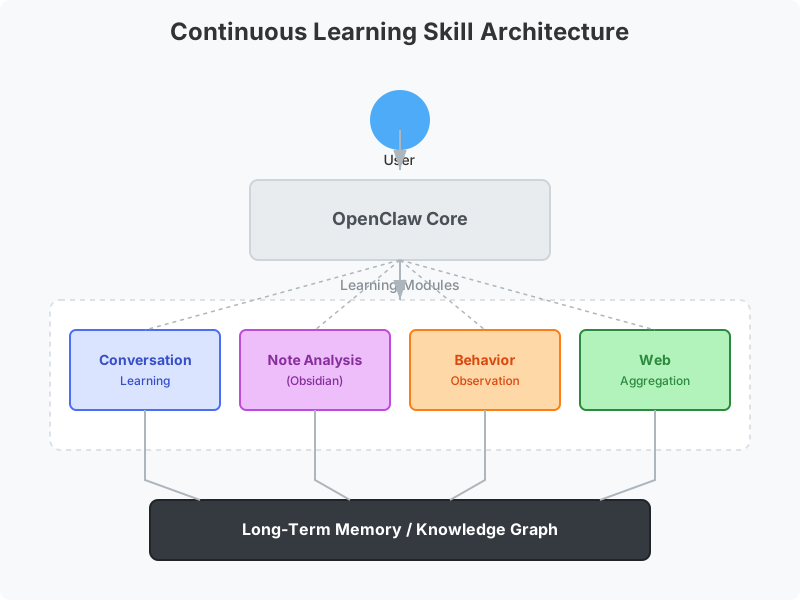
      <p>The entire skill consists of four core modules:</p>
      
      <figure style="text-align: center; margin: 2rem 0;">
        <img src="/assets/images/architecture.svg" alt="Continuous Learning Skill Architecture" style="max-width: 100%; height: auto; border: 1px solid #eee; border-radius: 8px;" />
        <figcaption style="margin-top: 0.5rem; color: #666; font-size: 0.9rem;">Architecture Overview</figcaption>
      </figure>

      <h3>1. Conversation Learning Module</h3>
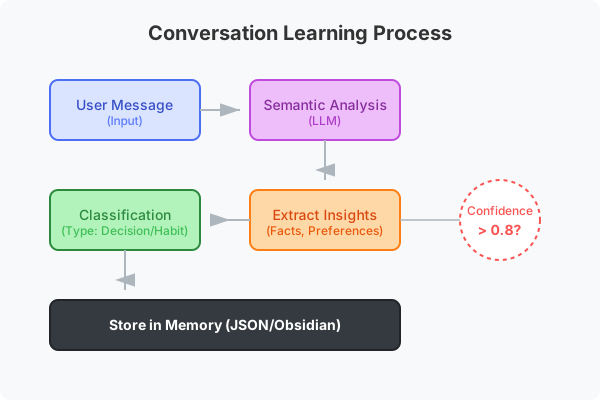
      <p>This module analyzes every conversation between the user and AI. It identifies important snippets—such as the user's profession, hobbies, and decision-making preferences—and stores these insights into long-term memory.</p>
      
      <figure style="text-align: center; margin: 2rem 0;">
        <img src="/assets/images/conversation-flow.svg" alt="Conversation Learning Flow" style="max-width: 100%; height: auto; border: 1px solid #eee; border-radius: 8px;" />
        <figcaption style="margin-top: 0.5rem; color: #666; font-size: 0.9rem;">Conversation Learning Workflow</figcaption>
      </figure>
      
      <p>Key Technologies:</p>
      <ul>
        <li>Semantic analysis for key information extraction</li>
        <li>Confidence scoring system to ensure only reliable info is stored</li>
        <li>Automatic classification: preferences, habits, decisions, knowledge</li>
      </ul>

      <h3>2. Note Analysis Module</h3>
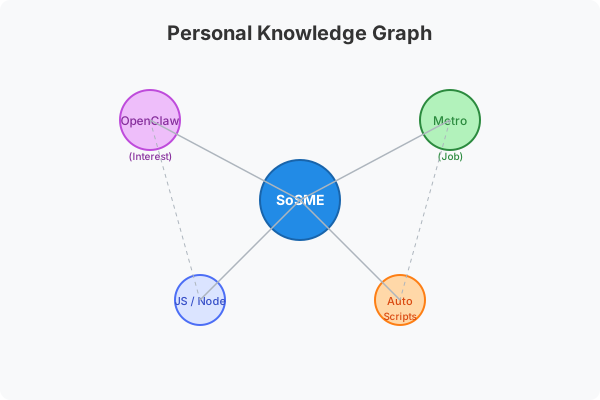
      <p>Connects to the user's Obsidian knowledge base, parses note content, and identifies knowledge nodes and relationships. This helps the AI understand the user's knowledge system.</p>
      
      <figure style="text-align: center; margin: 2rem 0;">
        <img src="/assets/images/knowledge-graph.svg" alt="Knowledge Graph Concept" style="max-width: 100%; height: auto; border: 1px solid #eee; border-radius: 8px;" />
        <figcaption style="margin-top: 0.5rem; color: #666; font-size: 0.9rem;">Knowledge Graph Concept</figcaption>
      </figure>
      
      <p>Features:</p>
      <ul>
        <li>Supports Frontmatter metadata parsing</li>
        <li>Automatically extracts tags and link relationships</li>
        <li>Builds personal knowledge graphs</li>
        <li>Supports mixed Chinese-English content</li>
      </ul>

      <h3>3. Behavior Observation Module</h3>
      <p>Records user usage patterns, such as most active times, preferred response types, and common workflows. This information is used to optimize AI response strategies.</p>

      <h3>4. Web Aggregation Module</h3>
      <p>Automatically collects and organizes web content interesting to the user, supporting RSS subscriptions and keyword monitoring.</p>

      <h2>🛠️ Tech Stack</h2>
      
      <ul>
        <li><strong>Runtime</strong>: Node.js</li>
        <li><strong>Language</strong>: JavaScript (ES Modules)</li>
        <li><strong>AI Service</strong>: Gemini API (Embeddings and Summarization)</li>
        <li><strong>Storage</strong>: Local JSON files</li>
        <li><strong>Documentation</strong>: Markdown</li>
      </ul>

      <h2>💡 Development Challenges</h2>

      <h3>Challenge 1: Parsing Session Formats</h3>
      <p>OpenClaw's session logs are in JSON Lines format, containing system events, user messages, tool calls, and more. The biggest challenge was correctly parsing these complex nested structures to extract valuable conversation content.</p>
      
      <p><strong>Solution</strong>: Wrote a dedicated parser capable of identifying different message types, filtering out internal system events, and keeping only meaningful User-AI interactions.</p>

      <h3>Challenge 2: Handling Chinese Content</h3>
      <p>As a Chinese user, I needed to ensure the skill handles Chinese content correctly. This includes Chinese segmentation, semantic understanding, and mixed language scenarios.</p>
      
      <p><strong>Solution</strong>: Used Gemini's embedding models, which have excellent multilingual support and accurately understand Chinese semantics.</p>

      <h3>Challenge 3: International Release</h3>
      <p>To make the skill accessible to global OpenClaw users, I needed to internationalize the entire project, using English as the primary language while keeping Chinese translations.</p>
      
      <p><strong>Solution</strong>:</p>
      <ul>
        <li>Refactored project structure with English as the main documentation language</li>
        <li>Created a complete <code>docs/</code> directory for Chinese translations</li>
        <li>Updated all sample data and configuration files</li>
      </ul>

      <h2>📊 Project Data</h2>
      
      <p>During the development of this skill, I accumulated some interesting data:</p>
      
      <ul>
        <li>Extracted <strong>209 valid messages</strong> from <strong>267 sessions</strong></li>
        <li>Wrote over <strong>3,000 lines of code</strong></li>
        <li>Created <strong>4 core modules</strong></li>
        <li>Authored <strong>bilingual documentation</strong> (totaling approx. 50KB)</li>
      </ul>

      <h2>🚀 How to Use</h2>
      
      <p>If you want to use this skill, the steps are simple:</p>
      
      <ol>
        <li>Clone the repo: <code>git clone https://github.com/fjmw123/continuous-learning-skill.git</code></li>
        <li>Install dependencies: <code>npm install</code></li>
        <li>Initialize config: <code>node scripts/init-learning.mjs</code></li>
        <li>Configure <code>.env</code> file with your API keys</li>
        <li>Run the learning pipeline: <code>node scripts/learning-pipeline.mjs</code></li>
      </ol>

      <h2>🎯 Future Plans</h2>
      
      <p>The first version of this skill is just the beginning. I plan to add more features in the future:</p>
      
      <ul>
        <li><strong>Knowledge Graph Visualization</strong> - Visually display knowledge connections</li>
        <li><strong>Smart Recommendations</strong> - Recommend relevant articles and resources based on learned content</li>
        <li><strong>Multi-user Support</strong> - Distinguish learning data for different users</li>
        <li><strong>Cloud Sync</strong> - Support syncing learning data to the cloud</li>
      </ul>

      <h2>🙏 Acknowledgements</h2>
      
      <p>This project wouldn't be possible without the support of the OpenClaw community. Special thanks to OpenClaw for providing such a powerful platform that allowed me to build something this fun.</p>
      
      <p>If you're interested in this skill, feel free to visit the <a href="https://github.com/fjmw123/continuous-learning-skill">GitHub Repository</a>, give it a ⭐, or submit Issues and PRs!</p>

      <hr style="margin: 3rem 0;" />
      
      <p style="color: var(--text-tertiary); font-size: 0.9375rem;">
        <em>Published on February 12, 2026 · Tags: OpenClaw, AI, JavaScript, Project Summary</em>
      </p>
    </div>
  </article>
</div>]]></content><author><name>SoSME</name></author><category term="OpenClaw" /><category term="AI" /><category term="JavaScript" /><category term="Project Summary" /><summary type="html"><![CDATA[How I Built a Continuous Learning Skill for OpenClaw February 12, 2026 OpenClaw AI JavaScript Project Summary Today, my first open-source project, Continuous Learning Skill, is officially released. This is an intelligent skill developed for OpenClaw that enables AI assistants to continuously learn user preferences, habits, and knowledge. This article documents the entire development process.]]></summary></entry><entry><title type="html">我如何为 OpenClaw 构建了一个自动学习技能</title><link href="https://fjmw123.github.io/blog/2026/02/12/openclaw-continuous-learning-skill/" rel="alternate" type="text/html" title="我如何为 OpenClaw 构建了一个自动学习技能" /><published>2026-02-12T15:00:00+00:00</published><updated>2026-02-12T15:00:00+00:00</updated><id>https://fjmw123.github.io/blog/2026/02/12/openclaw-continuous-learning-skill</id><content type="html" xml:base="https://fjmw123.github.io/blog/2026/02/12/openclaw-continuous-learning-skill/"><![CDATA[<div class="container">
  <article class="content">
    <header class="post-header">
      <h1>我如何为 OpenClaw 构建了一个自动学习技能</h1>
      <p class="post-date">2026年02月12日</p>
      <div style="margin-top: 1rem;">
        
          <span class="tag">OpenClaw</span>
        
          <span class="tag">AI</span>
        
          <span class="tag">JavaScript</span>
        
          <span class="tag">项目总结</span>
        
      </div>
    </header>
    
    <div class="post-content">
      <p class="lead">今天，我的第一个开源项目 <strong>Continuous Learning Skill</strong> 正式发布了。这是一个为 OpenClaw 开发的智能技能，能够让 AI 助手持续学习用户的偏好、习惯和知识。这篇文章记录了整个开发过程。</p>

      <h2>🎯 为什么要做这个项目？</h2>
      
      <p>在使用 OpenClaw 的过程中，我发现一个有趣的问题：每次对话都是全新的开始，AI 不会"记住"我们之间之前的交流。虽然 OpenClaw 提供了记忆功能，但我想让它更智能——不仅能存储记忆，还能主动从多个维度学习和进化。</p>
      
      <p>于是有了这个想法：构建一个<strong>自动学习技能</strong>，让 AI 能够：</p>
      
      <ul>
        <li>从对话中提取关键信息和用户偏好</li>
        <li>分析 Obsidian 笔记库，构建知识图谱</li>
        <li>观察用户行为模式，优化响应策略</li>
        <li>自动聚合网络内容，扩展知识边界</li>
      </ul>

      <h2>🏗️ 架构设计</h2>
      
      <p>整个技能分为四个核心模块：</p>
      
      <!-- <figure style="text-align: center; margin: 2rem 0;">
        <img src="/assets/images/architecture-zh.svg" alt="Continuous Learning Skill Architecture" style="max-width: 100%; height: auto; border: 1px solid #eee; border-radius: 8px;">
        <figcaption style="margin-top: 0.5rem; color: #666; font-size: 0.9rem;">系统架构全景图</figcaption>
      </figure> -->

      <h3>1. 对话学习模块 (Conversation Learning)</h3>
      <p>这个模块负责分析用户与 AI 的每一次对话。它会识别重要的信息片段，比如用户的职业、兴趣爱好、决策偏好等，并将这些洞察存储到长期记忆中。</p>
      
      <!-- <figure style="text-align: center; margin: 2rem 0;">
        <img src="/assets/images/conversation-flow-zh.svg" alt="Conversation Learning Flow" style="max-width: 100%; height: auto; border: 1px solid #eee; border-radius: 8px;">
        <figcaption style="margin-top: 0.5rem; color: #666; font-size: 0.9rem;">对话学习流程示意</figcaption>
      </figure> -->
      
      <p>关键技术点：</p>
      <ul>
        <li>使用语义分析提取关键信息</li>
        <li>置信度评分系统，确保只存储可靠的信息</li>
        <li>自动分类：偏好、习惯、决策、知识</li>
      </ul>

      <h3>2. 笔记分析模块 (Note Analysis)</h3>
      <p>连接用户的 Obsidian 知识库，解析笔记内容，识别知识节点和关联关系。这个模块帮助 AI 理解用户的知识体系。</p>
      
      <!-- <figure style="text-align: center; margin: 2rem 0;">
        <img src="/assets/images/knowledge-graph-zh.svg" alt="Knowledge Graph Concept" style="max-width: 100%; height: auto; border: 1px solid #eee; border-radius: 8px;">
        <figcaption style="margin-top: 0.5rem; color: #666; font-size: 0.9rem;">知识图谱构建概念图</figcaption>
      </figure> -->
      
      <p>功能特性：</p>
      <ul>
        <li>支持 Frontmatter 元数据解析</li>
        <li>自动提取标签和链接关系</li>
        <li>构建个人知识图谱</li>
        <li>支持中英文混合内容</li>
      </ul>

      <h3>3. 行为观察模块 (Behavior Observation)</h3>
      <p>记录用户的使用模式，比如何时最活跃、偏好什么类型的回复、常用的工作流等。这些信息用于优化 AI 的响应策略。</p>

      <h3>4. 网络聚合模块 (Web Aggregation)</h3>
      <p>自动收集和整理用户感兴趣的网络内容，支持 RSS 订阅和关键词监控。</p>

      <h2>🏃‍♂️ 实战效果展示</h2>
      
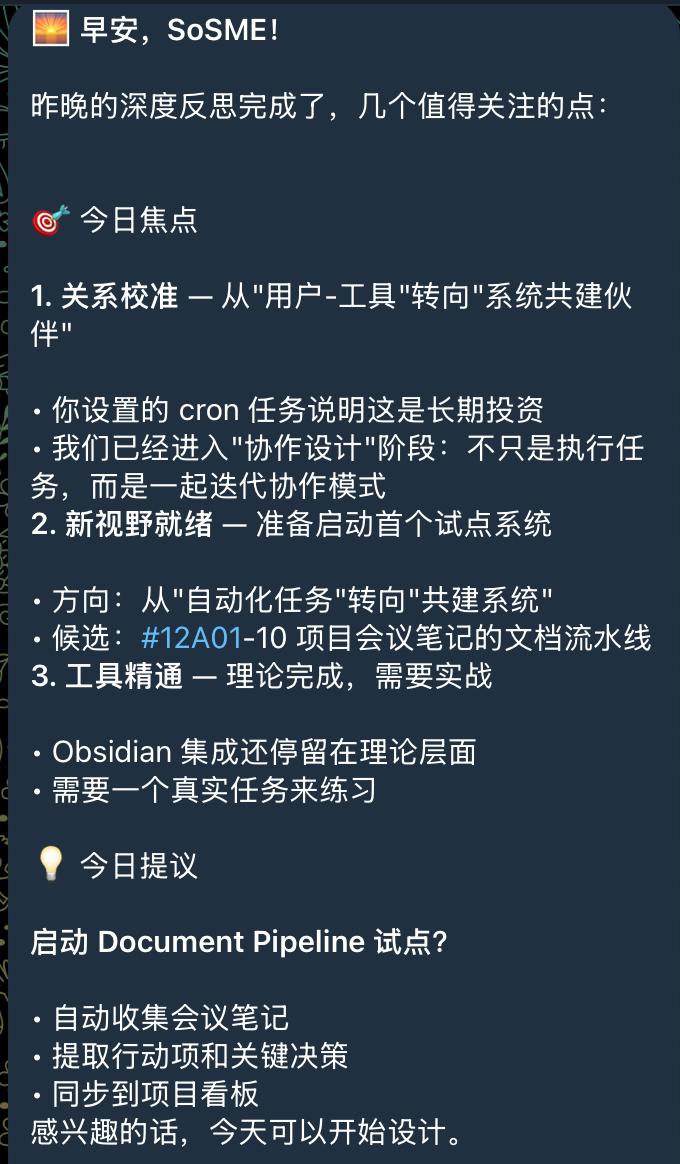
      <p>这是技能运行时的实际效果。Deep Reflection 模块会定期进行深度反思，主动提出系统共建建议：</p>

      <figure style="text-align: center; margin: 2rem 0;">
        <img src="/assets/images/demo-deep-reflection.jpg" alt="Deep Reflection Analysis" style="max-width: 100%; height: auto; border: 1px solid #eee; border-radius: 8px;" />
        <figcaption style="margin-top: 0.5rem; color: #666; font-size: 0.9rem;">Deep Reflection 深度反思报告</figcaption>
      </figure>

      <p>同时，对话学习模块会在后台默默工作，分析每一条消息：</p>

      <figure style="text-align: center; margin: 2rem 0;">
        <img src="/assets/images/demo-chat-interface.jpg" alt="Chat Analysis" style="max-width: 100%; height: auto; border: 1px solid #eee; border-radius: 8px;" />
        <figcaption style="margin-top: 0.5rem; color: #666; font-size: 0.9rem;">对话学习模块运行日志</figcaption>
      </figure>

      <h2>🛠️ 技术栈</h2>
      
      <ul>
        <li><strong>运行时</strong>: Node.js</li>
        <li><strong>语言</strong>: JavaScript (ES Modules)</li>
        <li><strong>AI 服务</strong>: Gemini API (嵌入和摘要)</li>
        <li><strong>数据存储</strong>: 本地 JSON 文件</li>
        <li><strong>文档</strong>: Markdown</li>
      </ul>

      <h2>💡 开发过程中的挑战</h2>

      <h3>挑战 1: 会话格式解析</h3>
      <p>OpenClaw 的会话记录是 JSON Lines 格式，包含系统事件、用户消息、工具调用等多种类型。最大的挑战是正确解析这些复杂的嵌套结构，提取有价值的对话内容。</p>
      
      <p><strong>解决方案</strong>: 编写了专门的解析器，能够识别不同类型的消息，过滤掉系统内部事件，只保留有意义的用户-AI 交互。</p>

      <h3>挑战 2: 中文内容处理</h3>
      <p>作为一个中文用户，我需要确保技能能够正确处理中文内容。包括中文分词、语义理解、以及中英文混合场景。</p>
      
      <p><strong>解决方案</strong>: 使用 Gemini 的嵌入模型，它对多语言支持很好，能够准确理解中文语义。</p>

      <h3>挑战 3: 国际化发布</h3>
      <p>为了让技能能够被全球 OpenClaw 用户使用，我需要将整个项目国际化，以英文为主语言，同时保留中文翻译。</p>
      
      <p><strong>解决方案</strong>:</p>
      <ul>
        <li>重构项目结构，主文档使用英文</li>
        <li>创建完整的 <code>docs/</code> 目录存放中文翻译</li>
        <li>更新所有示例数据和配置文件</li>
      </ul>

      <h2>📊 项目数据</h2>
      
      <p>开发这个技能的过程中，我积累了一些有趣的数据：</p>
      
      <ul>
        <li>从 <strong>267 个会话</strong>中提取了 <strong>209 条有效消息</strong></li>
        <li>编写了超过 <strong>3000 行代码</strong></li>
        <li>创建了 <strong>4 个核心模块</strong></li>
        <li>撰写了 <strong>中英双语文档</strong>（总计约 50KB）</li>
      </ul>

      <h2>🚀 如何使用</h2>
      
      <p>如果你想使用这个技能，步骤很简单：</p>
      
      <ol>
        <li>克隆仓库: <code>git clone https://github.com/fjmw123/continuous-learning-skill.git</code></li>
        <li>安装依赖: <code>npm install</code></li>
        <li>初始化配置: <code>node scripts/init-learning.mjs</code></li>
        <li>配置 <code>.env</code> 文件，添加你的 API 密钥</li>
        <li>运行学习流程: <code>node scripts/learning-pipeline.mjs</code></li>
      </ol>

      <h2>🎯 未来规划</h2>
      
      <p>这个技能的第一个版本只是一个开始。我计划在未来添加更多功能：</p>
      
      <ul>
        <li><strong>知识图谱可视化</strong> - 用图形方式展示知识关联</li>
        <li><strong>智能推荐</strong> - 基于学习内容推荐相关文章和资源</li>
        <li><strong>多用户支持</strong> - 区分不同用户的学习数据</li>
        <li><strong>云同步</strong> - 支持将学习数据同步到云端</li>
      </ul>

      <h2>🙏 感谢</h2>
      
      <p>这个项目的完成离不开 OpenClaw 社区的支持。特别感谢 OpenClaw 提供的强大平台，让我能够构建这样有趣的东西。</p>
      
      <p>如果你对这个技能感兴趣，欢迎访问 <a href="https://github.com/fjmw123/continuous-learning-skill">GitHub 仓库</a>，给个 ⭐ 或者提交 Issue 和 PR！</p>

      <hr style="margin: 3rem 0;" />
      
      <p style="color: var(--text-tertiary); font-size: 0.9375rem;">
        <em>Published on February 12, 2026 · 标签: OpenClaw, AI, JavaScript, 项目总结</em>
      </p>
    </div>
  </article>
</div>]]></content><author><name>SoSME</name></author><category term="OpenClaw" /><category term="AI" /><category term="JavaScript" /><category term="项目总结" /><summary type="html"><![CDATA[我如何为 OpenClaw 构建了一个自动学习技能 2026年02月12日 OpenClaw AI JavaScript 项目总结 今天，我的第一个开源项目 Continuous Learning Skill 正式发布了。这是一个为 OpenClaw 开发的智能技能，能够让 AI 助手持续学习用户的偏好、习惯和知识。这篇文章记录了整个开发过程。]]></summary></entry></feed>